WhatsApp Booking Messages for Nail Salons: Templates and Etiquette
Copy-ready WhatsApp messages for nail salons: booking replies, prices, confirmations, reschedules, late clients and no-shows, plus rules for the team.
By the CutieCure Salon teamPublished 7 min read
In short
- Answer a booking request with one short message that offers two or three concrete times and your booking link, instead of a string of questions.
- Save ready-made replies for the situations that come up every week (first reply, prices, confirmation, reschedule, running late, no-show, free slot, review) so every client gets the same rules.
- Keep appointment messages to the appointment. Ask before you send offers, never add clients to group chats, and let automatic reminders do the repetitive part.
Why a nail salon needs WhatsApp rules
For many salons, WhatsApp is the front desk. That is convenient for clients, but it creates its own problems: replies typed between clients with gloves on, ten messages to agree on one time, requests at midnight, prices quoted differently by different people and bookings that get lost in the chat.
You do not need to leave WhatsApp to fix this. You need three things: a few basic settings, clear response times and saved replies that the whole team uses.
Set up the basics first
- Use a business account. The WhatsApp Business app lets you show your address, hours, a short description and a link on your profile. Put your booking link there.
- Greeting and away messages. Set a short greeting for first-time contacts and an away message outside working hours. Both should include your booking link.
- Quick replies. Save the templates below as quick replies, so anyone on the team can send them in two taps.
- Labels. Mark chats as new request, waiting for client or booked, so nothing is forgotten at the end of a busy day.
- One owner per shift. Decide who answers the chat on each shift. Two people answering the same client is how double bookings happen.
Response times clients can live with
Clients do not expect an instant answer from someone who is doing nails. They expect to know when they will hear back. Answer between clients during opening hours, and let the away message answer the rest: it says when you will reply and that the booking link works at any time.
Avoid promising "we reply within 5 minutes" in your profile. A promise you cannot keep on a Saturday does more harm than no promise.
Templates to copy
Replace the parts in curly brackets. Keep each message short enough to read on a lock screen.
First reply to "Do you have time on Saturday?"
Price question
Confirmation of a booking you made for the client
The client asks to reschedule
The client is running late
The late clients guide explains how to choose the grace period behind this message.
After a no-show
Write the policy part from your own cancellation policy, and send this message the same day, calmly and without blame.
A slot just opened
Asking for a review
See how to get more Google reviews for when to send it and what to do with the replies.
Etiquette rules for the whole team
- Use the client's name and sign with yours, so she knows who she is talking to.
- One clear message, not five short ones. Put the time, the service and the next step in the same message.
- Write times and prices, do not record them. A client should be able to scroll back and find the time. Voice notes are fine for chatting, not for agreeing on a booking.
- Confirm every booking in writing, even if it was agreed by phone.
- Move complaints to a call. Long arguments in a chat rarely end well.
- Protect privacy. Do not share another client's name, photos or appointment, and do not post a client's nails without her permission.
- No group chats or broadcast lists without each client's agreement.
- Same rules for everyone. The quick replies are there so the policy does not change with whoever is holding the phone.
Offers and campaigns: ask first
A client who gave you her number for a booking expects messages about that booking. Offers are different. In many countries, promotional messages need the person's prior consent (in the EU, for example, under the privacy and e-marketing rules), and every promotional message should make it easy to say "no more, thanks".
A simple way to do it: ask once, after a visit, "Would you like a message when we have free slots or seasonal offers?" Keep a list of the clients who said yes, and send to them only.
Let automatic messages do the repetitive part
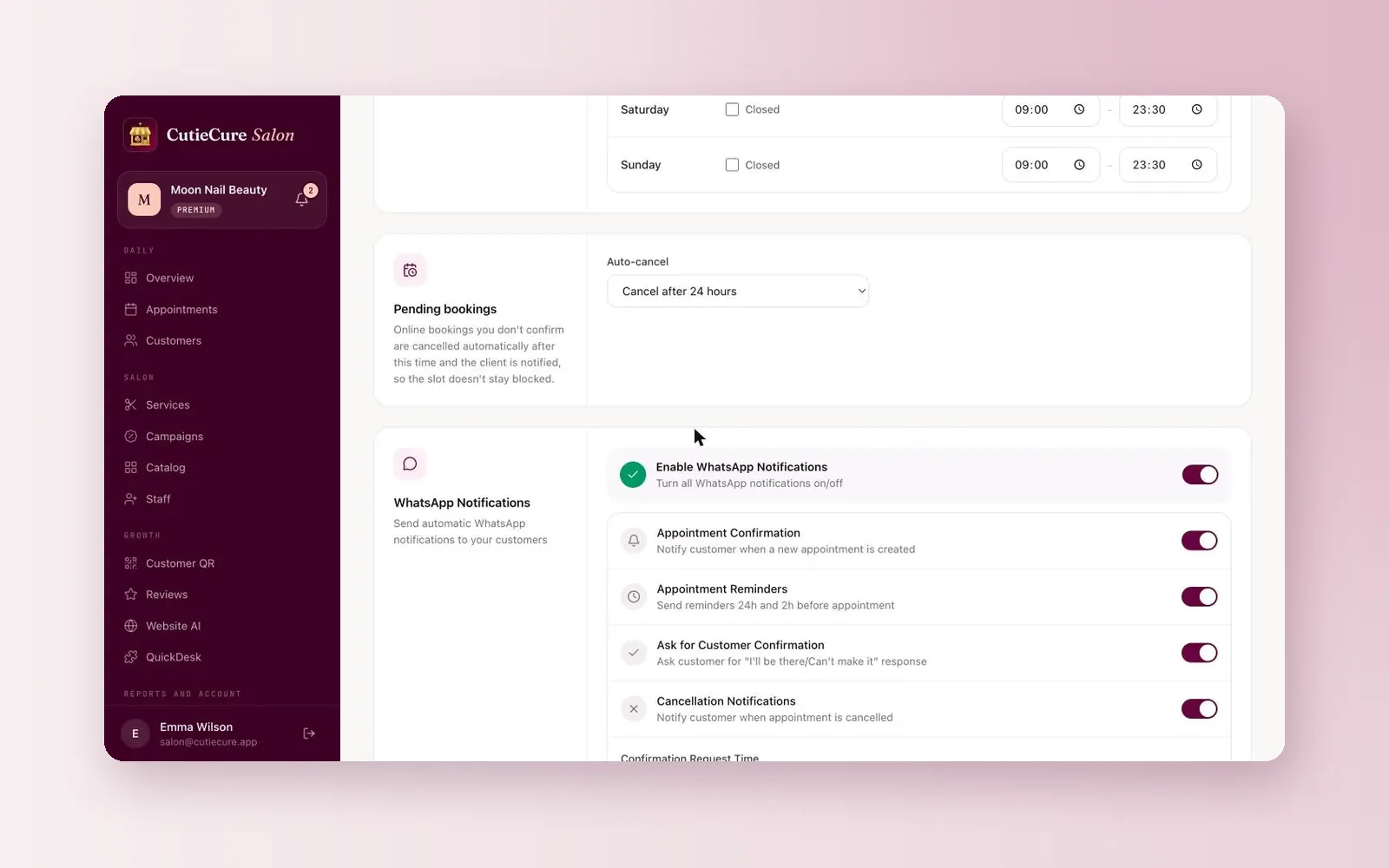
Templates save typing, but the most repetitive messages do not need a person at all. In CutieCure Salon, WhatsApp notifications are switched on in the settings, with a separate switch for each message: a confirmation when an appointment is created, reminders 24 hours and 2 hours before, a question the client answers with "I'll be there" or "Can't make it", and a notice when an appointment is cancelled.
When a client taps "Can't make it", the appointment is cancelled, the time opens up and you are notified, so you can send the "slot just opened" message above. Bookings made less than two hours before the appointment do not get reminders, so call to double-check those.
Your booking link answers the "when are you free?" question by itself: clients see your free times and book without a back-and-forth. When you add a booking that came through the chat, choose WhatsApp as its source, so you can see how many bookings the chat brings in. See the appointment software page for the full feature list, and use the no-show cost calculator to see what missed visits cost you today.
Free tools and next steps
- Appointment and scheduling software for nail salonsOnline booking, per-technician scheduling, client notes and no-show tracking for nail salons. No booking commission, 14-day free trial, no card.
- No-show cost calculator for nail salonsSee what no-shows and late cancellations cost you per month and per year, and what reminders and deposits could win back.
Frequently asked questions
How fast should a nail salon reply on WhatsApp?
During opening hours, as soon as you are between clients. Outside opening hours, an away message that says when you will reply and includes your booking link is enough. Avoid promising replies within minutes.
Should I send prices on WhatsApp?
Yes, for standard services, and use the same prices as your menu. For nail art, ask for a photo of the design and give a price before the appointment.
Is it OK to send appointment reminders on WhatsApp?
Reminders about an appointment the client booked are expected. Promotional messages are different: in many countries they need the client's prior consent.
What should I write when a client does not show up?
A short, calm message the same day: say you missed her, ask if everything is OK, restate what your policy says about missed appointments and offer a new time.
Can WhatsApp reminders be automatic?
Yes. CutieCure Salon can send WhatsApp confirmations, reminders 24 and 2 hours before, an "I'll be there / Can't make it" question and cancellation notices, each switched on separately in the settings.
Written by the team that builds CutieCure Salon, booking software for nail salons. When the product or a fact in this guide changes, we update the guide and the date above.
Put this into practice with CutieCure Salon
Online booking link, website widget, packages, customer groups, campaign codes and team performance in one dashboard, plus AI try-on for your clients.