Nail Salon Service Menu: How to Name, Group and Time Services
Build a nail salon service menu clients can book from: clear names, honest durations, removal and repairs, add-ons, packages and a quarterly review.
By the CutieCure Salon teamPublished 7 min read
In short
- Write the menu for the client who books on a phone: names clients would search for, one line on what is included, and a duration that matches the real appointment.
- Keep removal, fills and repairs as their own services, and put nail art and extras into add-ons or tiers instead of dozens of near-identical services.
- Review the menu every few months: drop services nobody books, fix durations that run late and check prices against your costs.
- 1. Why the menu decides more than prices
- 2. Start from categories, then a short core list
- 3. Name services the way clients say them
- 4. One line of description that prevents messages
- 5. Durations: time the real appointment
- 6. Removal, fills and repairs as their own services
- 7. Nail art and extras: tiers, not fifty services
- 8. Packages for what clients already book together
- 9. Prices on the menu
- 10. Clients who speak another language
- 11. Review the menu every few months
Why the menu decides more than prices
Your service menu is the list clients choose from when they book. Once clients book online, it does more work than the printed price list ever did: the name tells them what they get, the description answers their questions before they message you, and the duration decides how much of the calendar each booking takes.
A muddled menu shows up quickly: clients book the wrong service, appointments run late because the time was too short, and the same questions arrive in your messages every day. A clear menu fixes all three without any extra work at the desk.
Start from categories, then a short core list
Group what you do into a few categories clients already understand, and list the core services under each one. A typical nail salon structure looks like this; keep only what you actually offer:
- Manicure: classic manicure, gel manicure.
- Pedicure: classic pedicure, gel pedicure.
- Gel and extensions: new set, fill (infill), gel overlay on natural nails.
- Acrylic: full set, fill.
- Nail art: by tier or per nail (more on this below).
- Repair and removal: single nail repair, removal on its own.
Keep the core list short enough to read on a phone screen. Every service you add is one more thing to compare, and clients who cannot decide tend to message you instead of booking.
Name services the way clients say them
A client looking for a gel manicure scans for the words "gel manicure". A creative name such as "Velvet Ritual" makes her stop and guess. If you want a signature name, put the plain words first: "Gel manicure (Velvet Ritual)".
- Say whether it is gel or regular polish, a new set or a fill, and whether removal is included.
- Use the same name everywhere: booking page, Google Business Profile, Instagram and the price list at the desk.
- Avoid near-duplicates such as "Gel manicure" and "Gel mani" with different prices. Clients will pick the cheaper one.
One line of description that prevents messages
Write one or two short sentences per service: what is included and what is not. For example, "Shape, cuticle care and gel colour. Removal of old gel is a separate service." That single line answers the question you would otherwise get on WhatsApp.
Leave out promises you cannot keep for every client, such as how many weeks a set will last. Wear depends on the client's nails and habits as much as on your work.
Durations: time the real appointment
The duration is the part of the menu clients never see but feel the most. Too short and every day runs late; too long and you lose bookable time. Time a few real appointments for each service, from the client sitting down to the station being ready for the next one, including prep, drying and clean-up.
- 1Write down the real time of the last few appointments for each service.
- 2Use a typical time, not your fastest one, and round up to the slot length you work in.
- 3If one technician is much slower while she is learning, plan her extra time in her schedule rather than lengthening the service for everyone.
- 4Check again after a month and adjust.
In CutieCure Salon, each service has a duration, and a booking blocks that technician for the whole time, so the free times clients see on your booking page come straight from these numbers. The late clients guide covers the other half of keeping a day on time.
Removal, fills and repairs as their own services
Removal is where most menus get the time wrong. Removing gel or acrylic takes real time, and a client coming from another salon may need more than your own regulars. List removal as its own service, or offer clearly named combined services such as "Gel removal + new gel manicure" with the longer duration.
Do the same for repairs. A short "Single nail repair" service lets a client book a fix without taking a full appointment slot, and gives you a clear price for repairs outside any free-fix window. The redo policy guide explains how to decide what you fix for free.
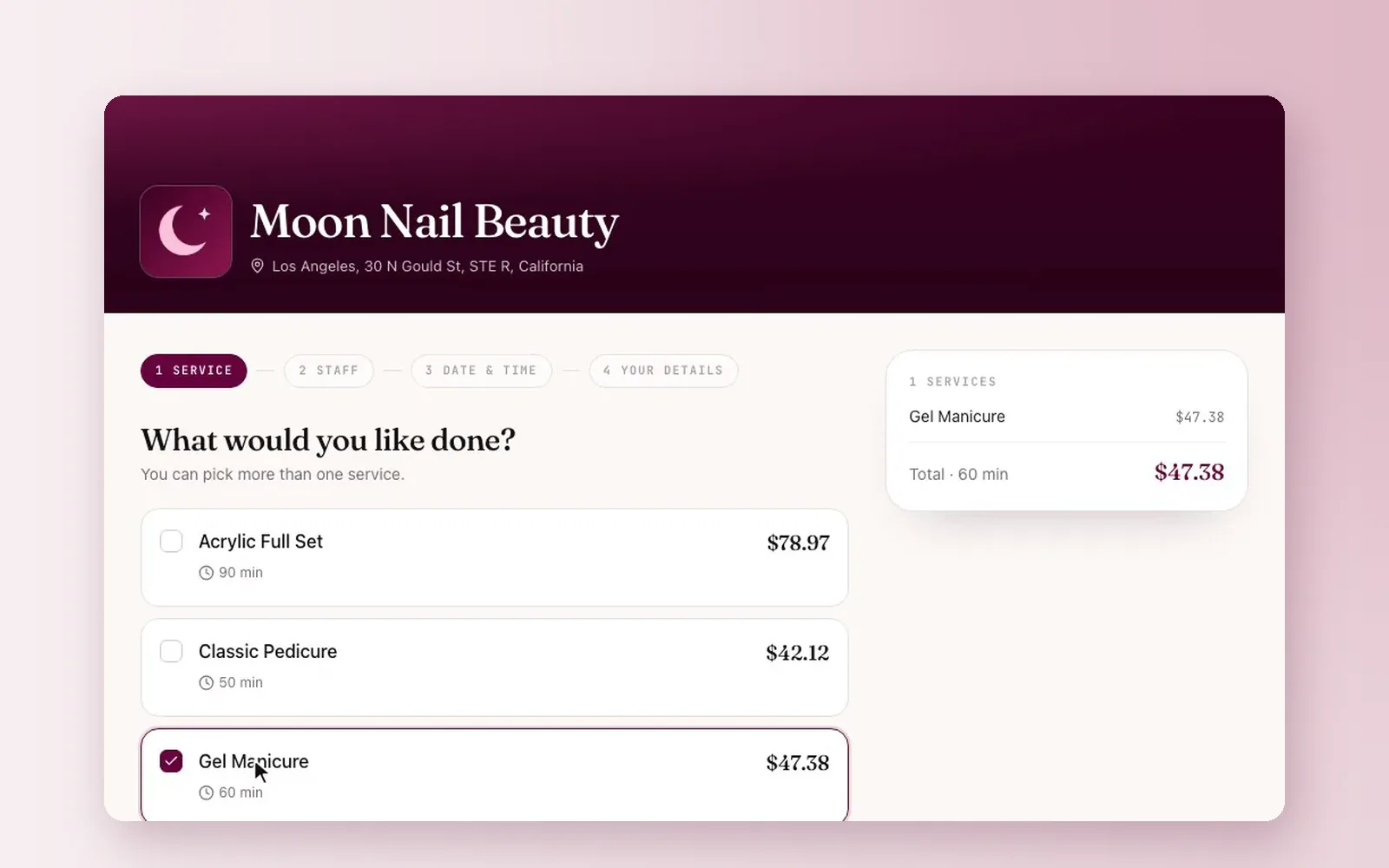
On a CutieCure Salon booking page, clients can pick more than one service in one booking, and the durations and prices add up. So "Gel removal" plus "Gel manicure" works without creating every combination as a separate service.
Nail art and extras: tiers, not fifty services
Nail art varies too much to list every design. Most menus handle it in one of two ways: tiers (simple, detailed, full set of art) with a price and time for each, or a price per nail for accents. Either way, put a few photos of each tier on Instagram or your catalog so clients can see what the tier means.
The nail art add-ons guide has wording for offering extras without pressure.
Packages for what clients already book together
Look at which services clients book together, such as a manicure and pedicure, and offer them as a package with a small saving. In CutieCure Salon a package bundles two or more services at one price, works out the total duration and regular price for you, and shows clients the saving when they book. The packages guide explains how to set the discount.
Prices on the menu
Price each service from your costs, not from the salon down the street: product, time and overhead, plus a margin. The pricing guide walks through the method, and the free nail service price calculator does the arithmetic and prints a price list.
If a service can cost more depending on length or design, say so in the description ("from" price, plus what changes it), so the bill at the end is not a surprise.
Clients who speak another language
If tourists or expats book with you, give each service a name they understand. In CutieCure Salon each service can have an optional English name, which visitors who browse your booking link or website widget in another language see instead of the original name.
Review the menu every few months
- 1List the services nobody booked in the last few months and remove or merge them.
- 2Check which services ran late most often and lengthen their duration.
- 3Compare prices with your current product costs and pay rates.
- 4Make sure the booking page, Google and the desk show the same names and prices.
The analytics page in CutieCure Salon shows your top services for the last 7, 30 or 90 days, which is a quick way to see what clients actually book.
Free tools and next steps
- Nail service price calculatorTurn product cost, time, hourly pay, overhead and margin into a suggested price per service, then print your price list.
- Appointment and scheduling software for nail salonsOnline booking, per-technician scheduling, client notes and no-show tracking for nail salons. No booking commission, 14-day free trial, no card.
Frequently asked questions
How many services should a nail salon menu have?
As few as cover what you really do. Keep a short core list per category and handle variations with add-ons, tiers or clear combined services, so clients can choose on a phone screen without messaging you.
Should gel removal be a separate service?
Usually yes, or offer clearly named combined services. Removal takes real time, and listing it separately keeps your durations right and your prices fair to clients who do not need it.
How do I put nail art on a menu?
Use tiers (for example simple, detailed and full set) with a price and duration each, or a price per nail for accents, and show photos of each tier so clients know what they are choosing.
Should I show prices on my online menu?
Yes. Clients who see prices before booking are less likely to be surprised at the desk. Use "from" prices with a short note on what changes the final price when it varies.
How often should I update my service menu?
Check it every few months: remove services nobody books, fix durations that run late and update prices when your costs change.
Written by the team that builds CutieCure Salon, booking software for nail salons. When the product or a fact in this guide changes, we update the guide and the date above.
Put this into practice with CutieCure Salon
Online booking link, website widget, packages, customer groups, campaign codes and team performance in one dashboard, plus AI try-on for your clients.